Rough mix to finished record.
Nine precise plugins for mixing and mastering, from the first fix to the final limiter. Built to the standard of paid tools and given away complete.
Windows 10 and 11, 64-bit. VST3.
Free. No account, no email, no data, no catch.
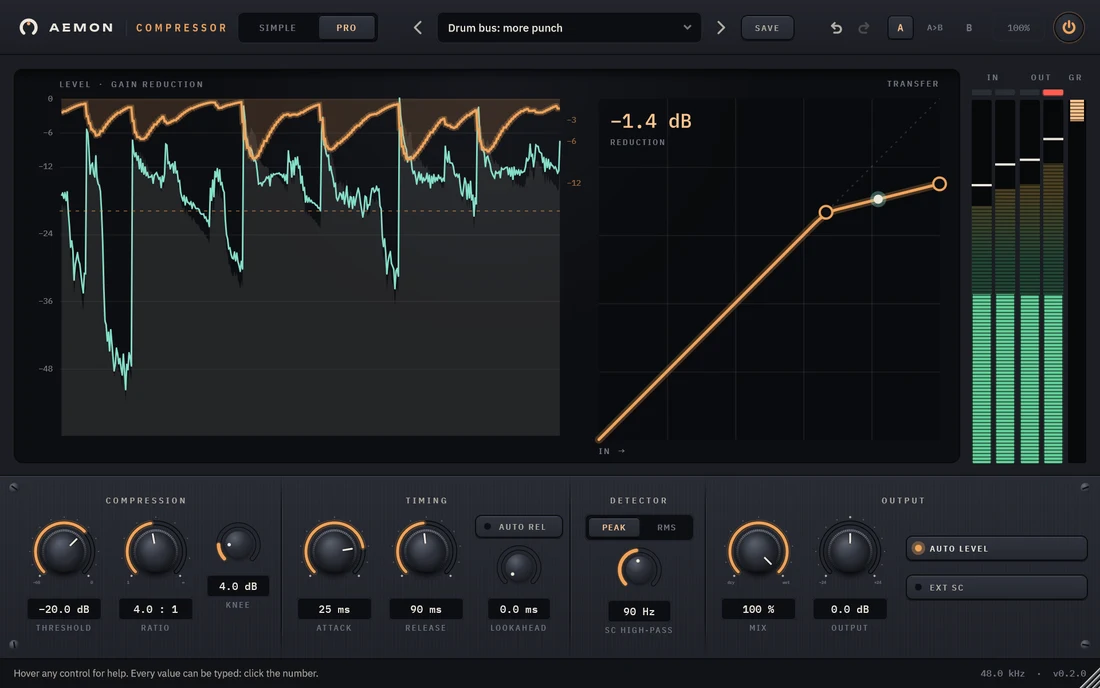
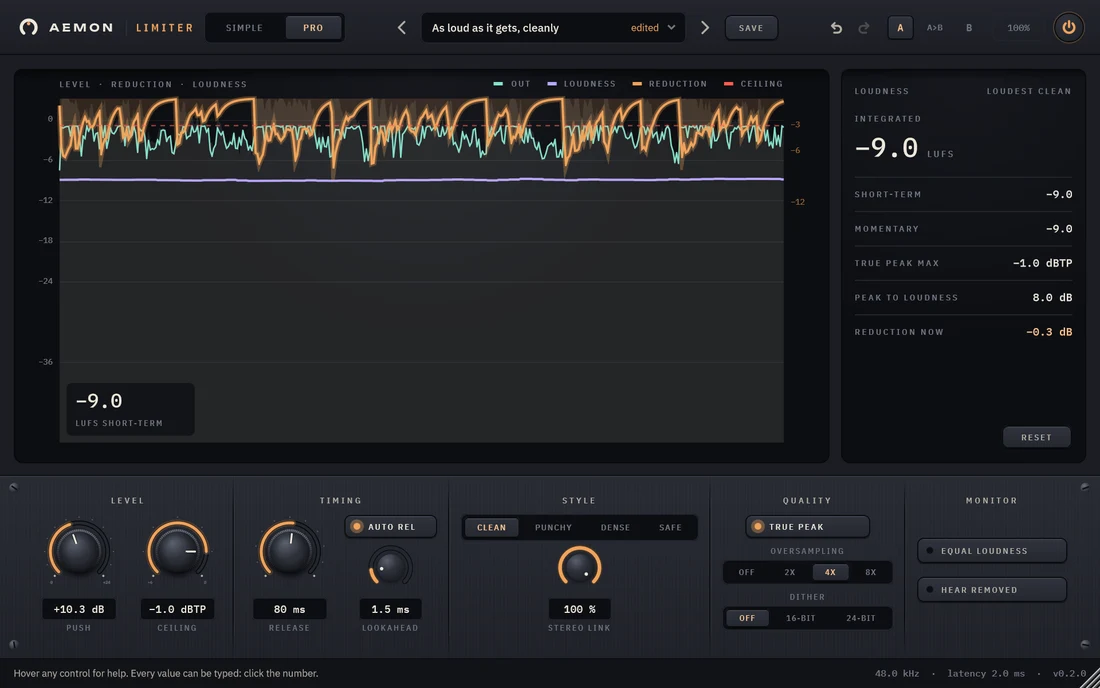
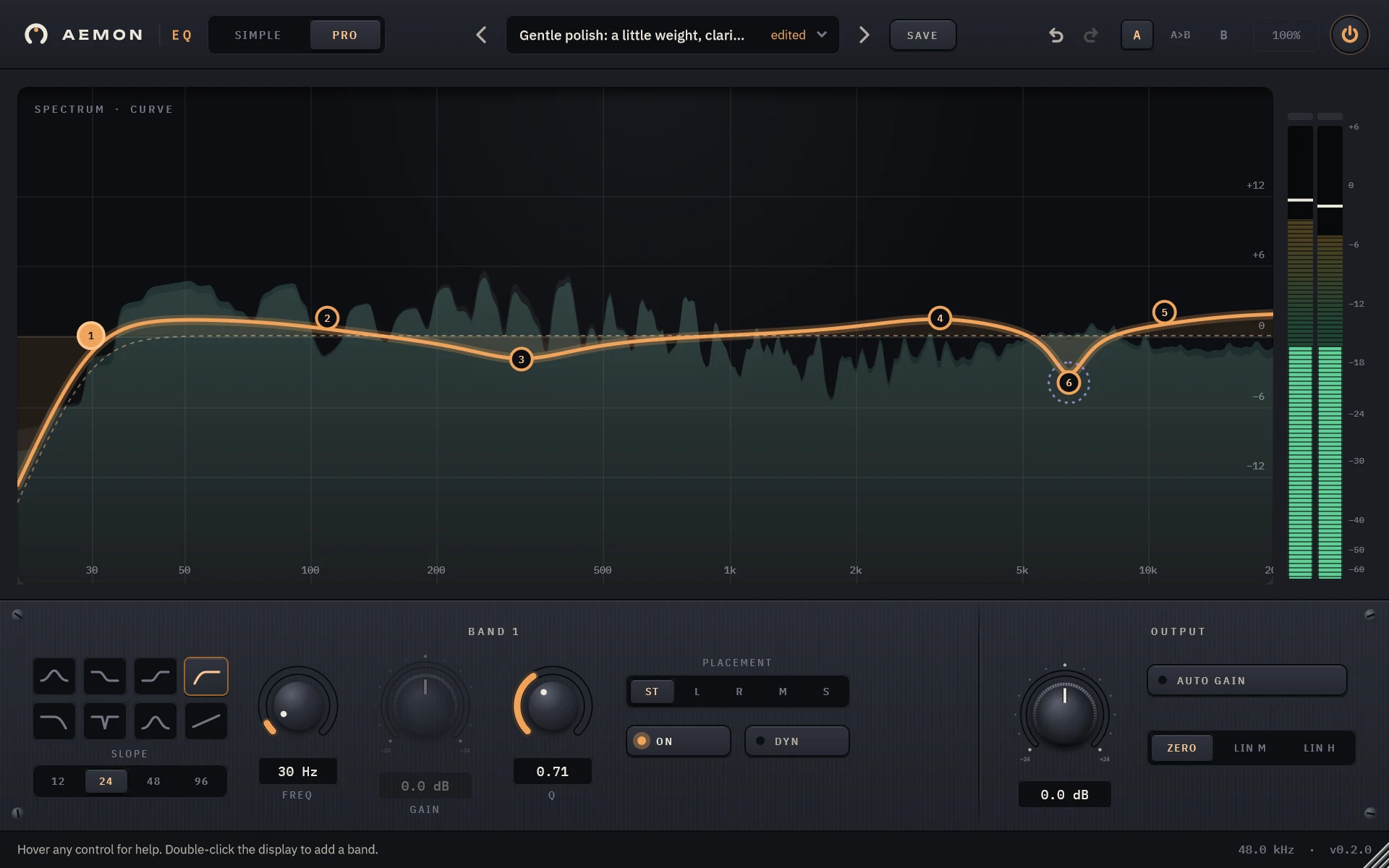
Same loudness. Now compare.
Louder always sounds better, so most demos cheat. Here both sides play equally loud. Turn matching off to hear what really happened to the level.
The music was written for this page. The processing was done by the same engines that run inside the plugins, with the settings shown. Press X to switch while it plays.
Aemon Utility
Find the problem before it costs you the mix.
Put it first on any channel, or last on the master. It tells you in one line whether the track is mono-safe, balanced, clean and on target, and fixes what isn’t.
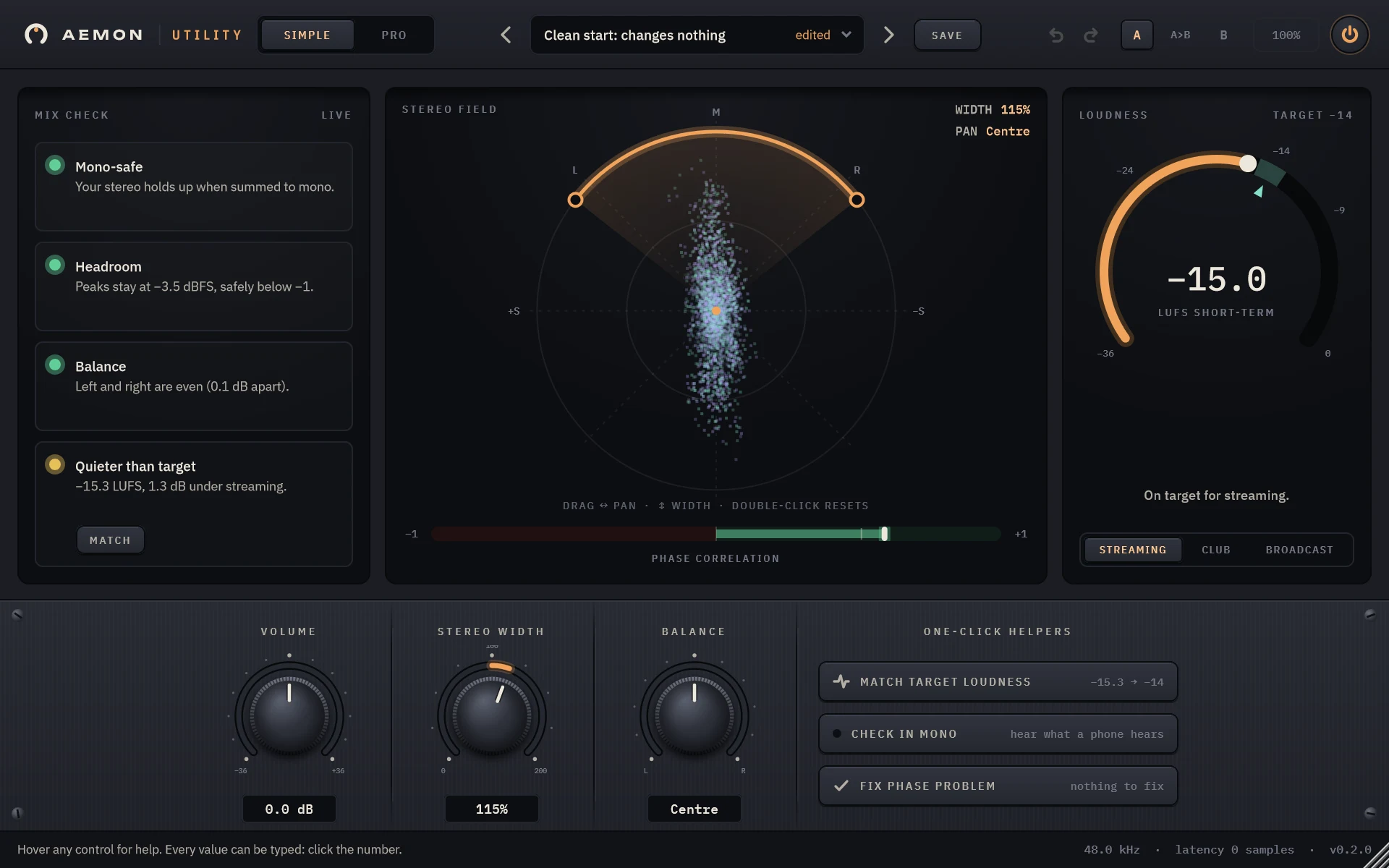
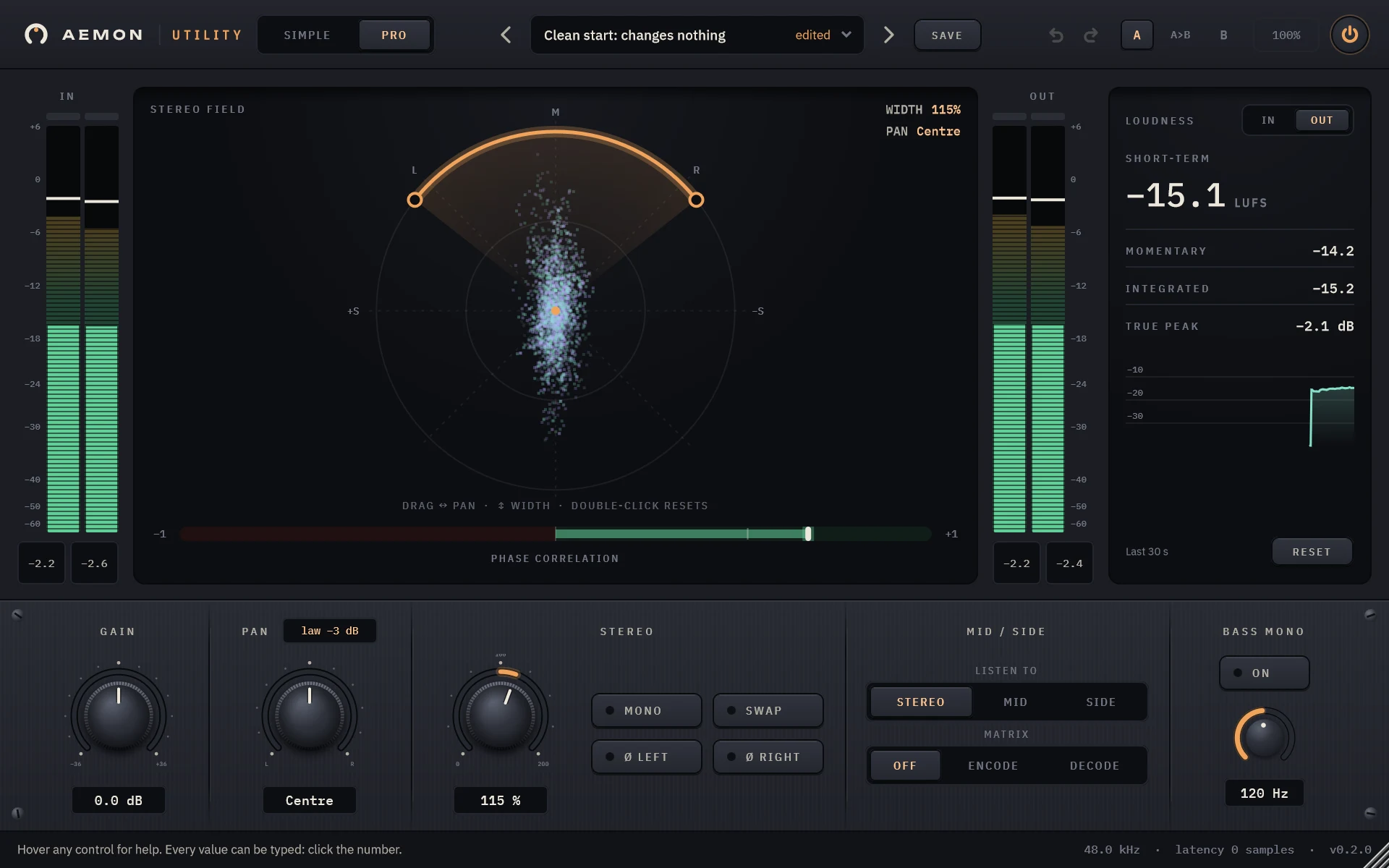
A mix check that talks
Mono safety, headroom, balance and loudness, in plain words and live. When something is off, the button to fix it is right there.
A stereo field you can grab
Drag the arc to pan and widen while you watch the phase correlation. Bass mono keeps the low end in the centre.
Loudness you can trust
Momentary, short-term, integrated and true peak to BS.1770, with streaming, club and broadcast targets.
Aemon EQ
The top end goes where you put it.
Most digital EQs squeeze their curves near 20 kHz. This one matches the analogue shape all the way up, with zero latency, and goes linear-phase when you need it.
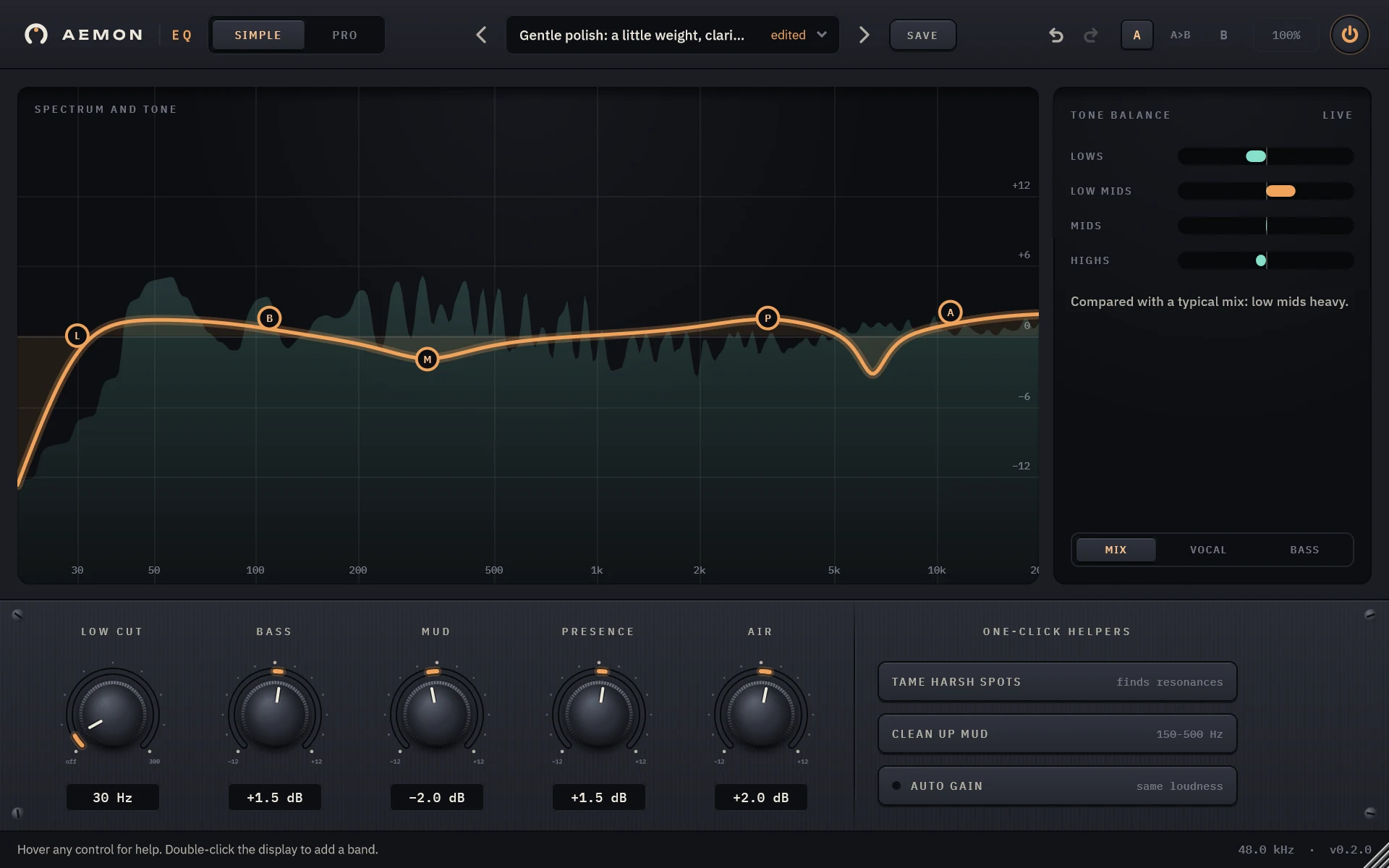
Bands that only act when needed
Make any band dynamic and it moves only when its own range gets too loud. Tame a harsh note without dulling the rest.
Work in the sides, or one side
Put each band on stereo, left, right, mid or side. Clean the bass out of the sides, or open the top without touching the voice.
Helpers that listen
Tame harsh spots and clean up mud in one click, then hear the result at the same loudness with auto gain.
Aemon De-esser
Softer S. Same voice.
It tells an S from a vowel, and judges it against how loud the singer is at that moment. A quiet verse and a loud chorus get the same care, and vowels come out untouched.
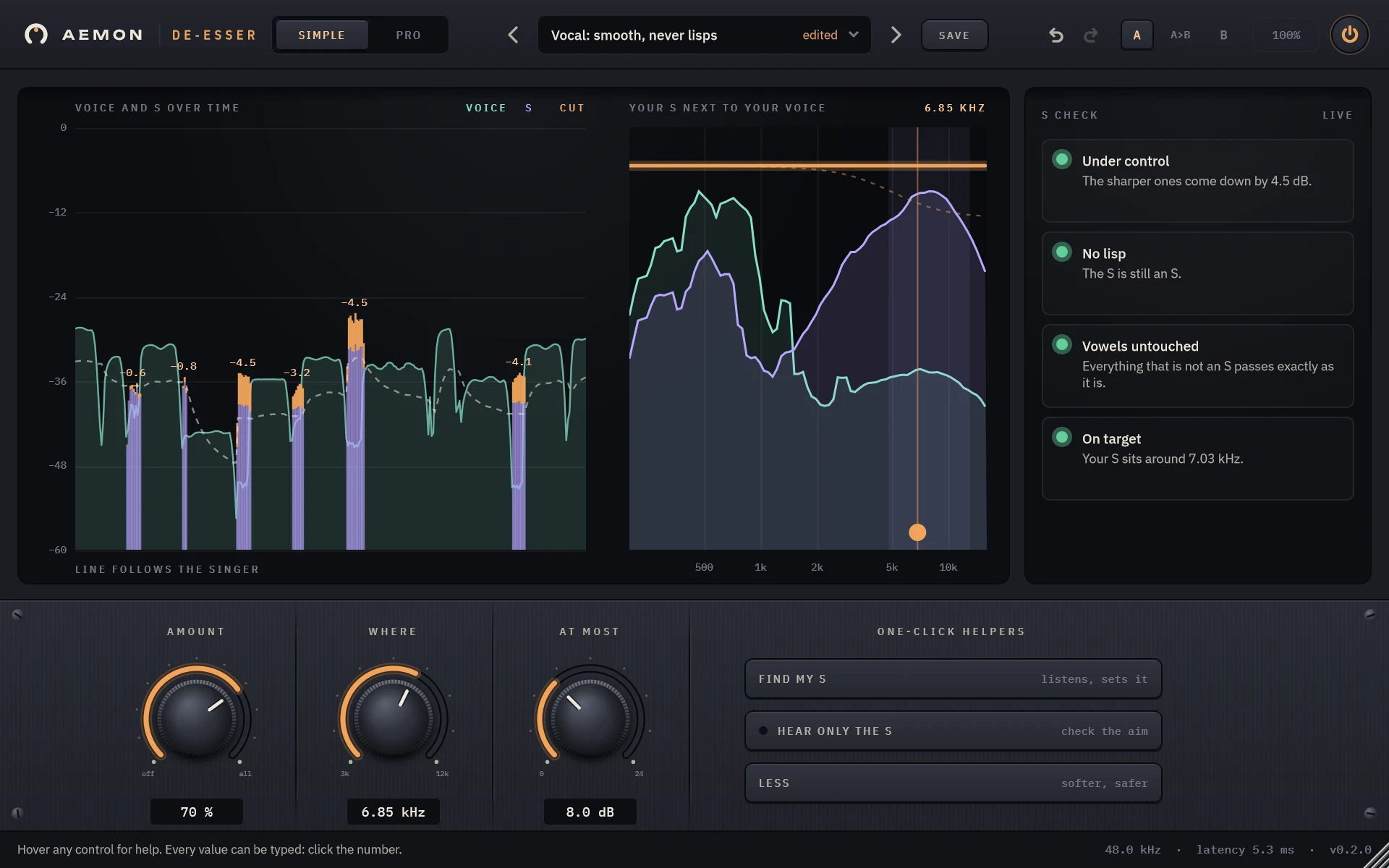
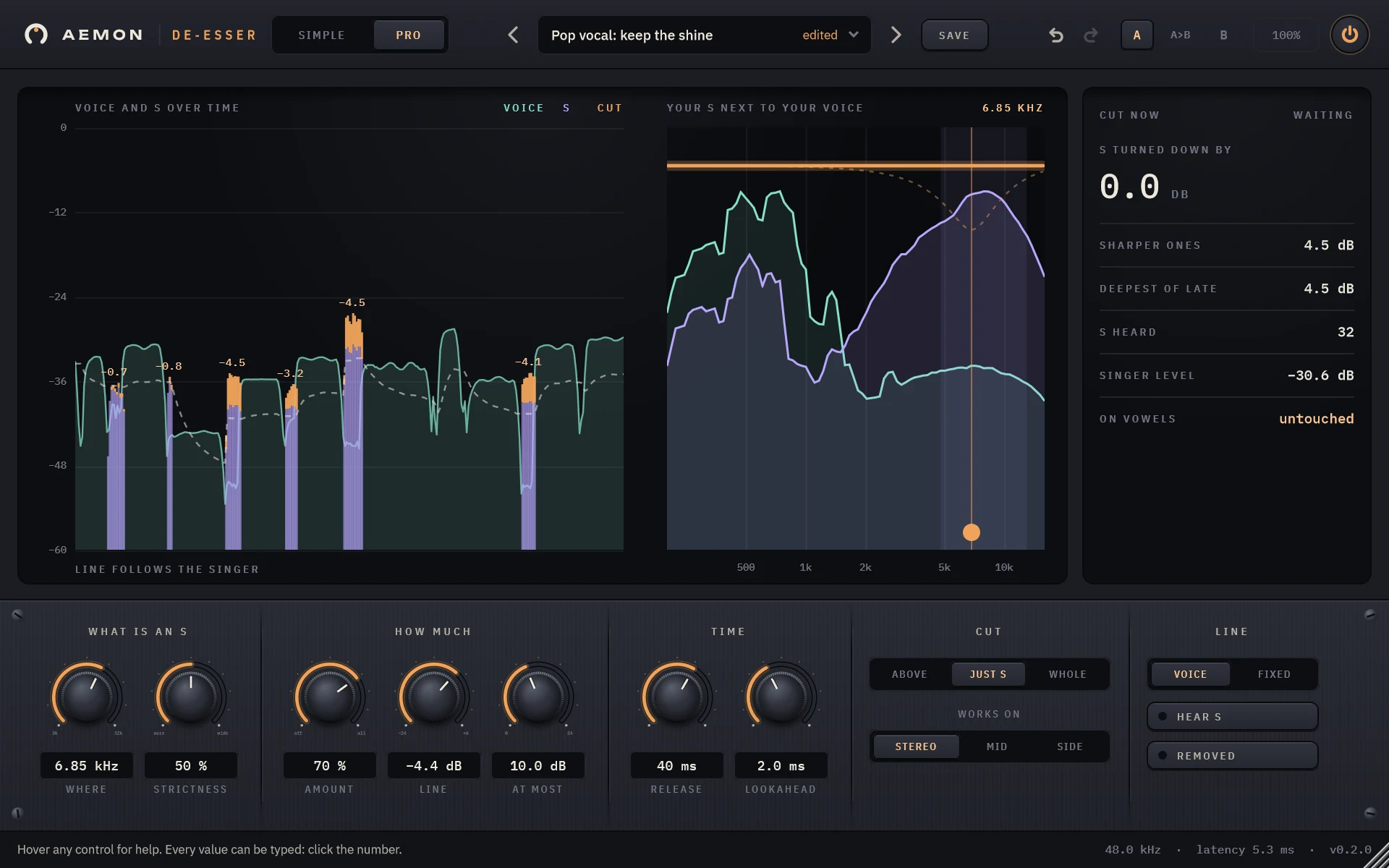
Find my S
Let the voice play and press one button. It listens back over the last seconds, finds where this singer’s S sits and sets a safe amount.
Presets with a goal
“About 4 dB off the sharp ones” means about 4 dB. Each voice preset aims itself at your recording, from rap to podcasts to backing vocals.
Cut above, the S, or all of it
Dip everything above the S, only the S itself, or the whole voice. On stereo, the middle or the sides, with the removed sound on its own.
Aemon Compressor
Hear the punch. Not the level trick.
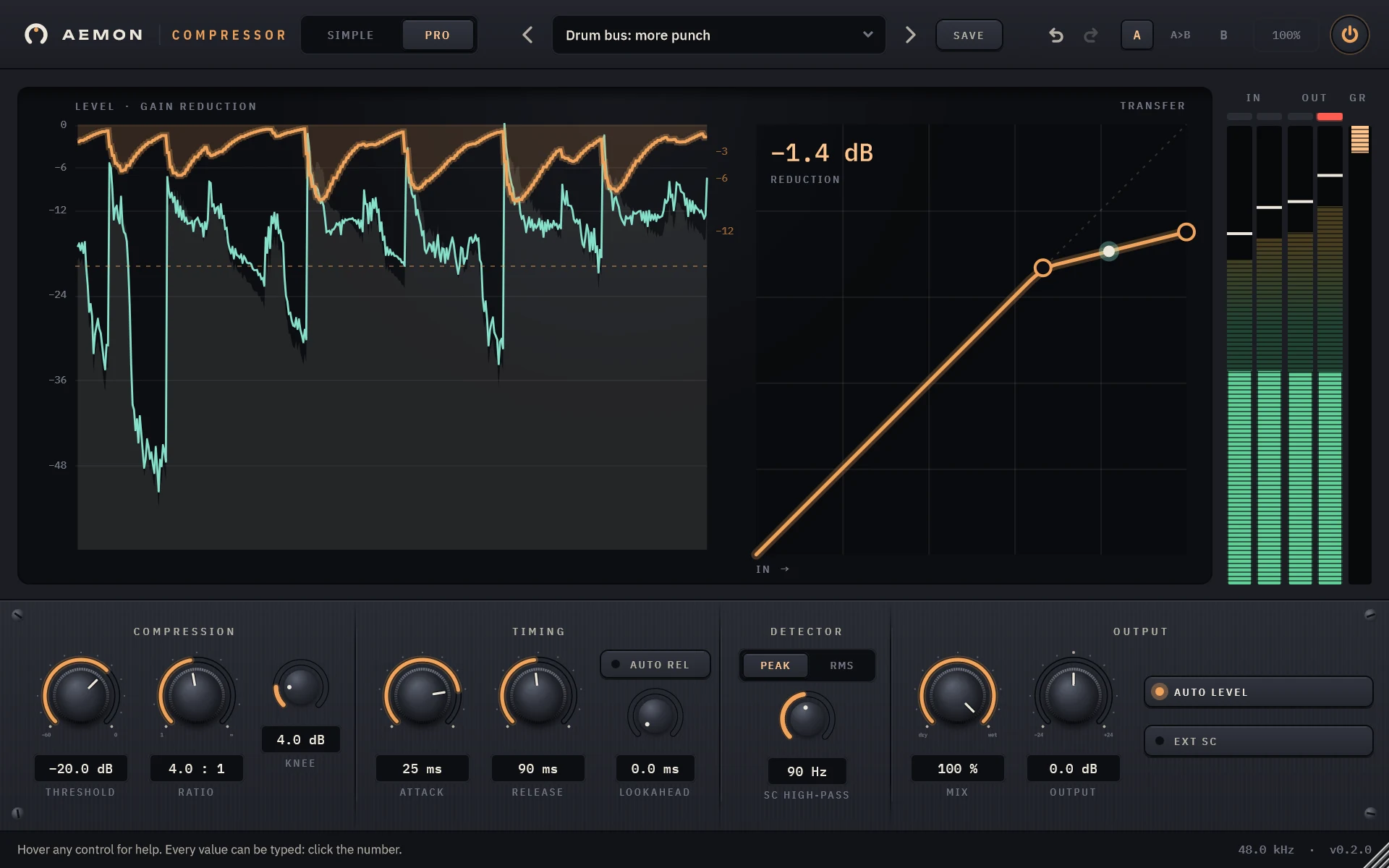
Clean compression with a display you can grab. Auto level keeps the output as loud as the input, so you judge the compression and nothing else.
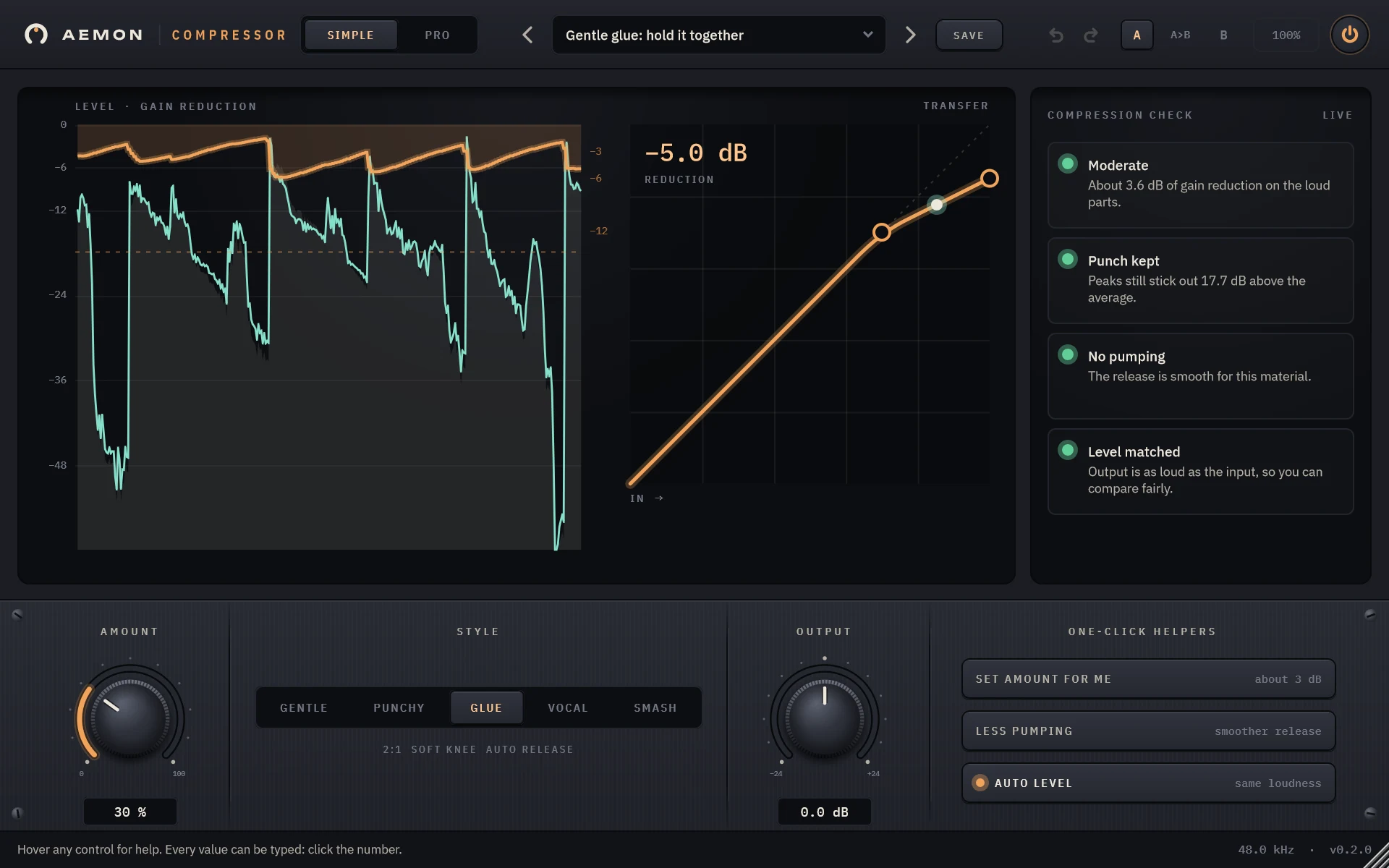
One amount, five styles
Gentle, Punchy, Glue, Vocal and Smash. Turn one knob and read whether it’s subtle, healthy or too much.
Room to catch the peak
Up to 10 ms of lookahead, peak or RMS detection, auto release, and a side-chain high-pass so the kick stops driving everything.
External side-chain and mix
Duck the bass under the kick or the music under a voice. Blend in the dry signal for parallel compression in place.
Aemon Multiband
Every part of the sound, held on its own.
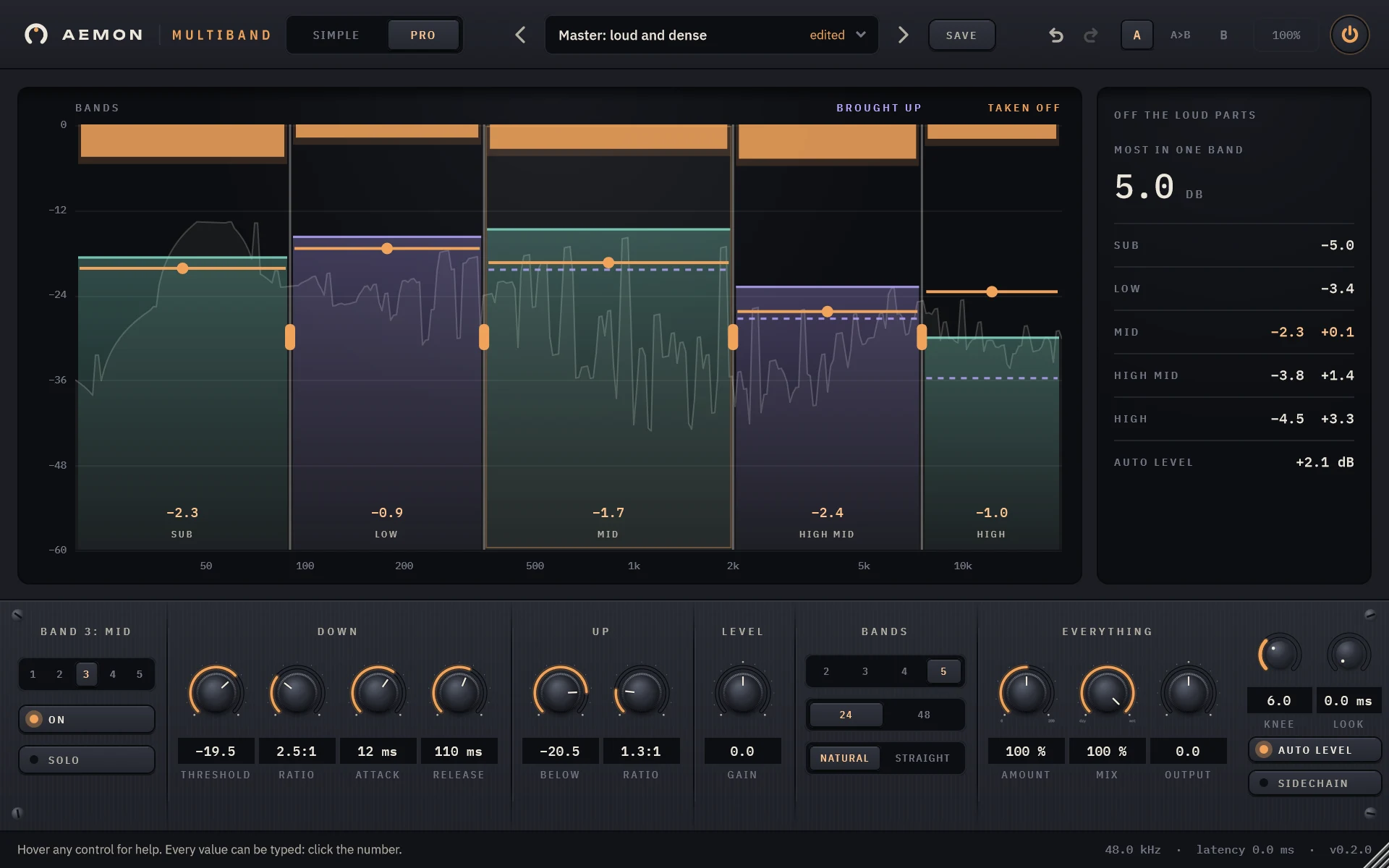
Two to five bands that turn loud parts down and bring quiet parts up. Choose a goal and it sets every line to the music you’re playing.
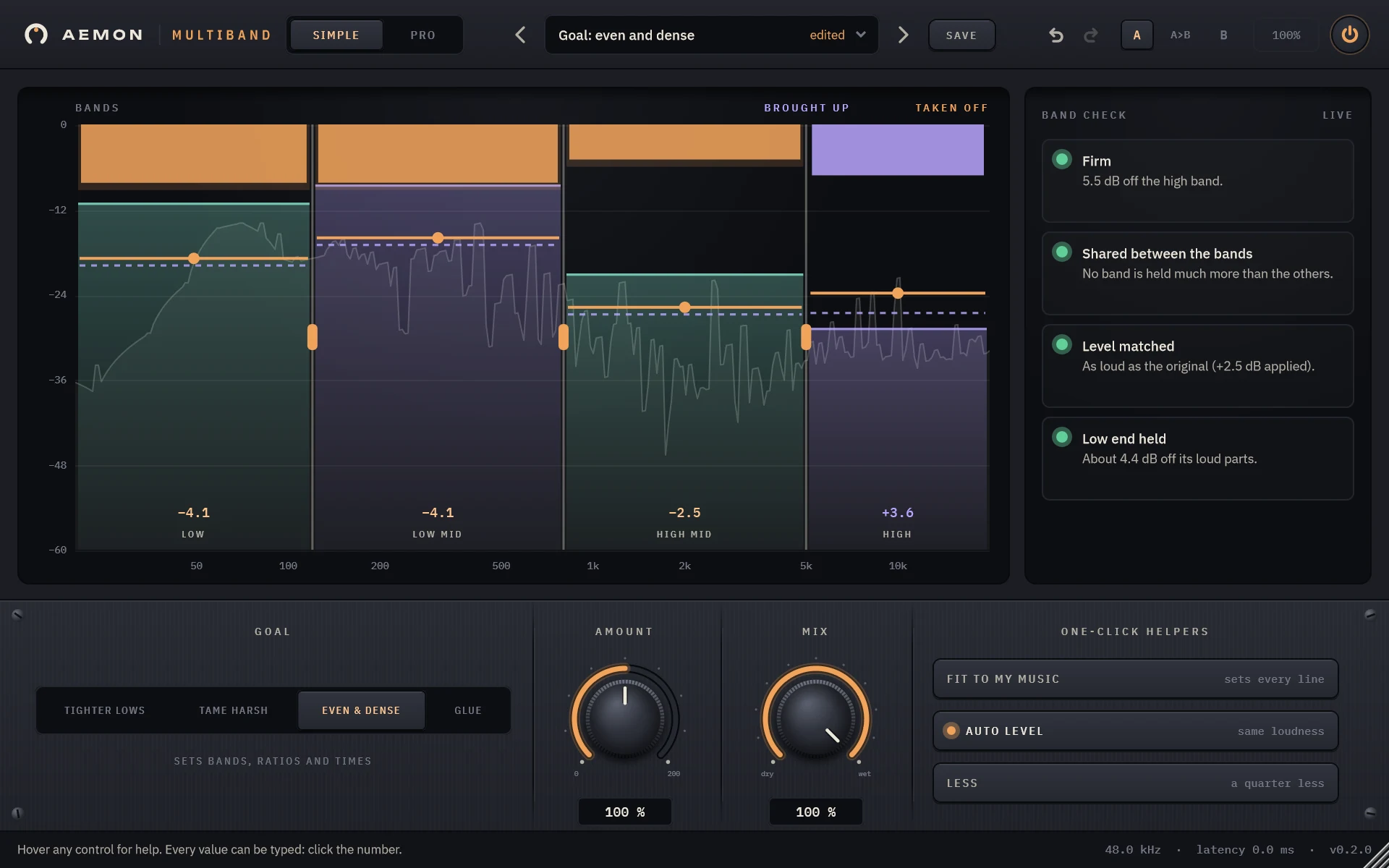
Pick a goal
Tighter lows, tame harsh, even and dense, or glue. Then Amount and Mix, and you’re done.
Fit to my music
Presets say how many dB they take off the loud parts. The plugin runs its own bands over the last eight seconds and finds the lines that do it.
Natural or straight phase
Zero-latency crossovers, or straight phase for mastering. Sidechain input, solo per band, and a mix that never combs.
Aemon Saturation
Colour you can see.
Four characters, from a little warmth to broken. The display shows the harmonics it adds, and they are the ones it really adds. The level stays matched, so you hear colour and not volume.
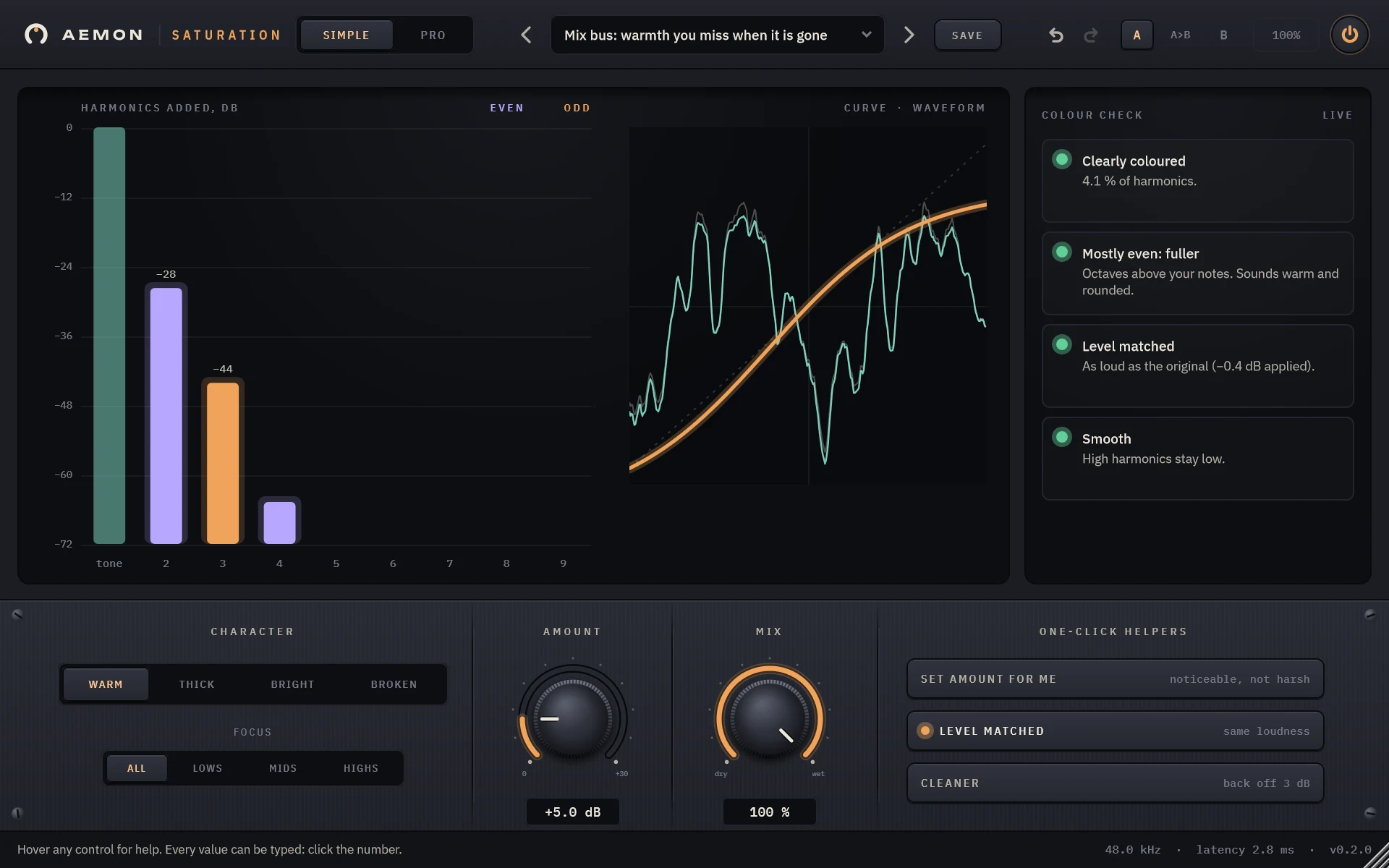
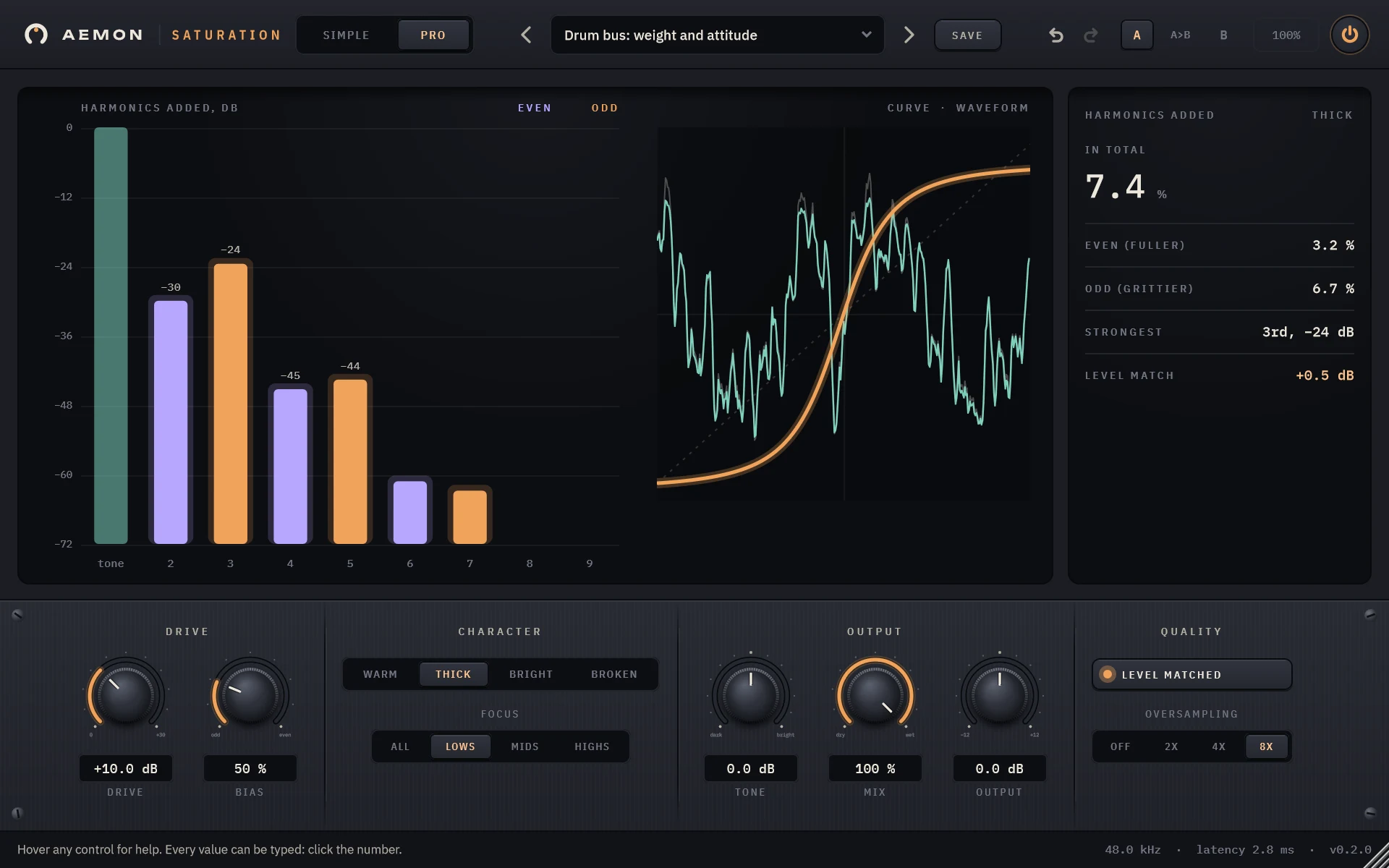
Four characters
Warm, Thick, Bright and Broken. Our own curves, described by what they do to the sound.
Aim it
Drive only the lows, mids or highs. Give an 808 the harmonics a phone can play and leave the rest clean.
Set amount for me
Finds an amount you can notice without it getting harsh. Cleaner takes 3 dB back whenever you want.
Aemon Imager
Wider. And mono doesn’t change.
Most wideners fall apart on a phone. This one only ever touches the difference between left and right, so what a mono speaker plays is what it played before.
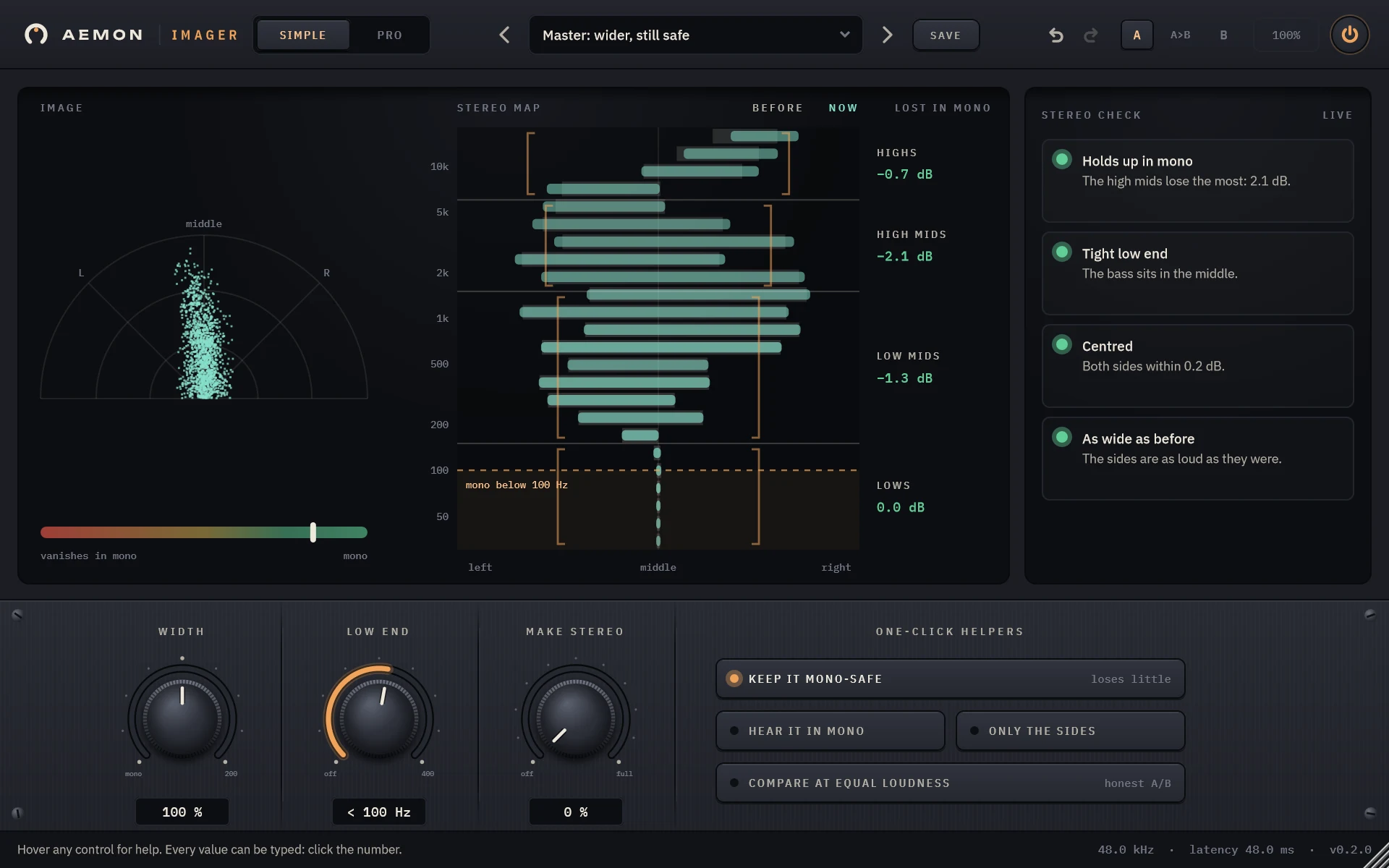
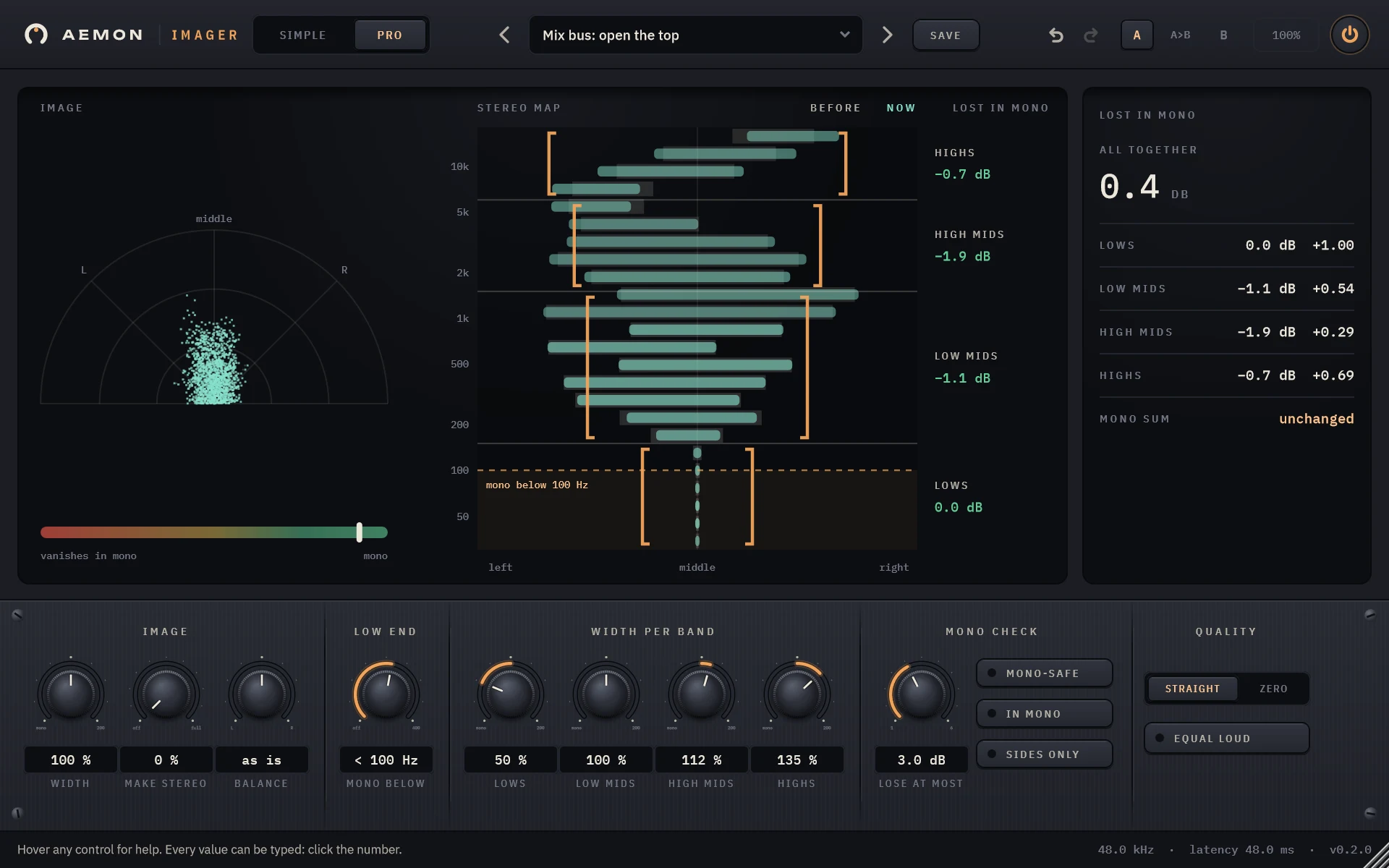
A plain mono check
It tells you how many dB each band loses in mono, and Keep it mono-safe holds that loss at the limit you choose.
Low end to the middle
Everything below the line goes to the centre. Tight on big systems, and ready for vinyl.
Make stereo
Opens up a mono synth, guitar or vocal. Whatever it adds disappears completely in mono.
Aemon Clipper
The peaks go. The punch stays.
It cuts the tallest instants so everything else can come up. Put it before the limiter and the limiter works less. From hard to soft, with a ceiling that holds between the samples.
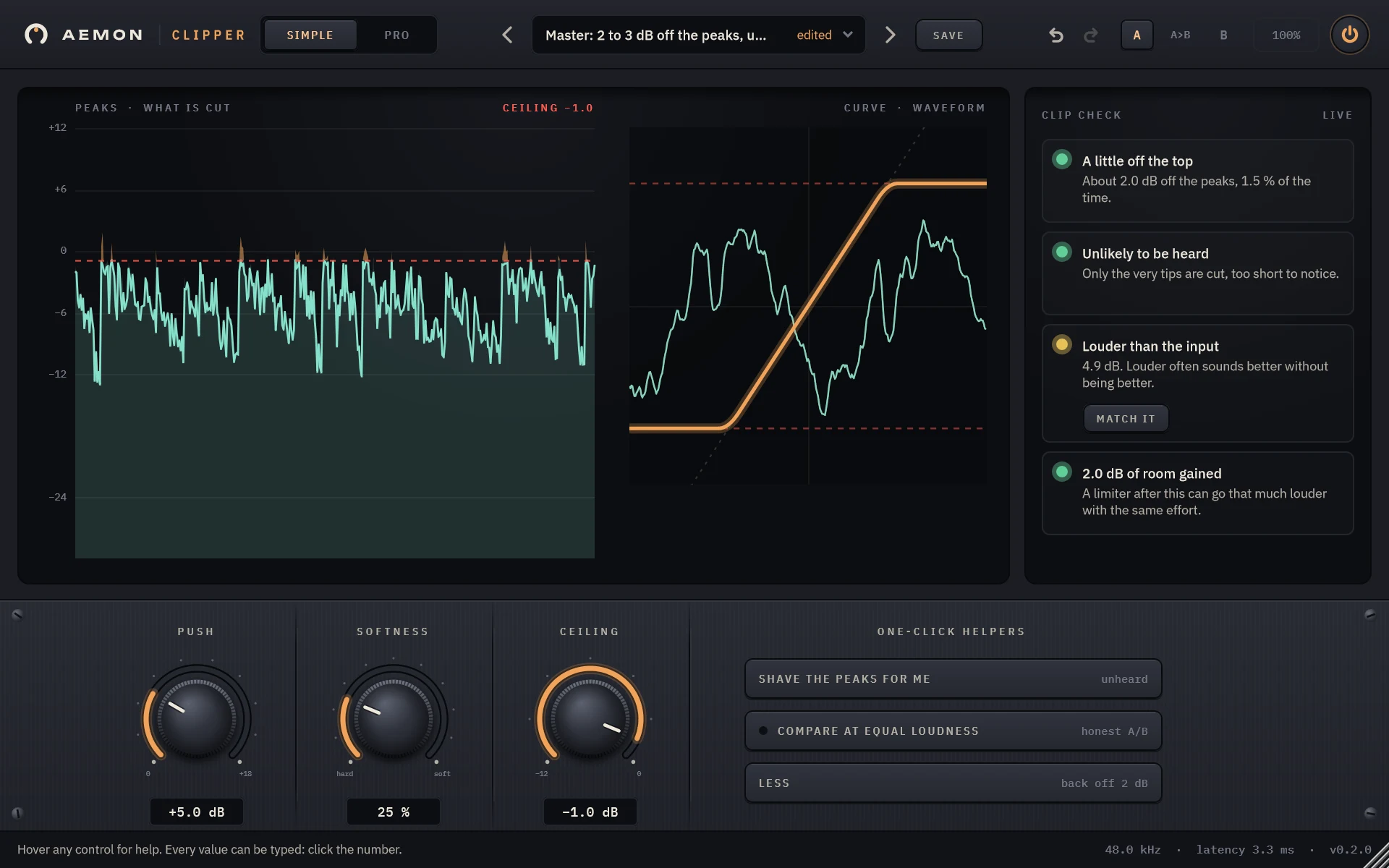
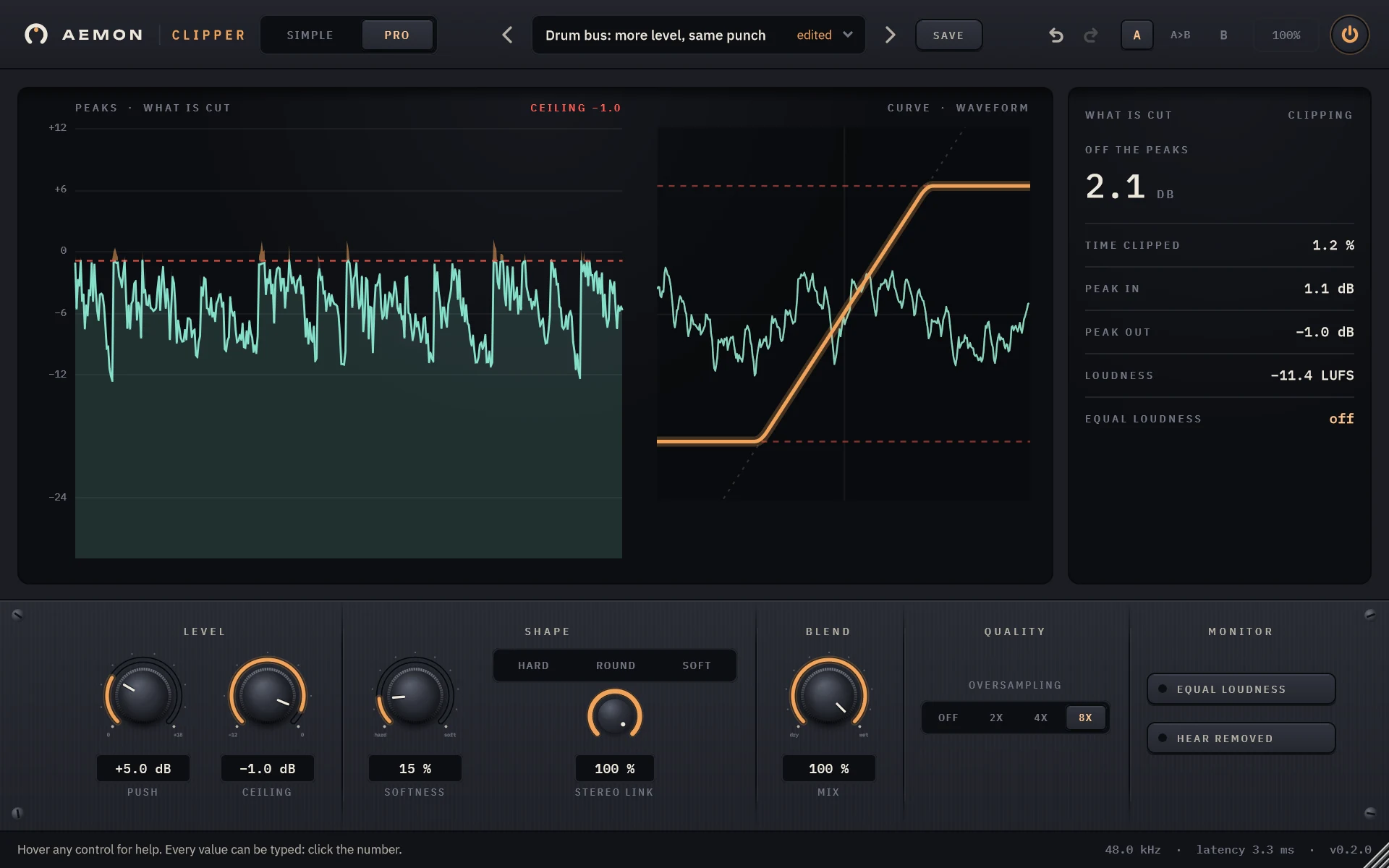
Shave the peaks for me
Finds how much you can take off before you’d hear it: 3 dB at most, and no more than one percent of the sound.
Hard, round or soft
One Softness control. Hard stays untouched right up to the ceiling. Soft bends early and adds warmth.
Clean where it counts
8× oversampling and a second anti-aliasing method keep false tones low, 90 dB down on a hard-clipped 5 kHz tone. Hear removed plays exactly what was cut.
Aemon Limiter
Loud enough. Never too far.
Pick a target, press one button, and it pushes until the sound would start to suffer. Then it stops. The ceiling holds between the samples too.
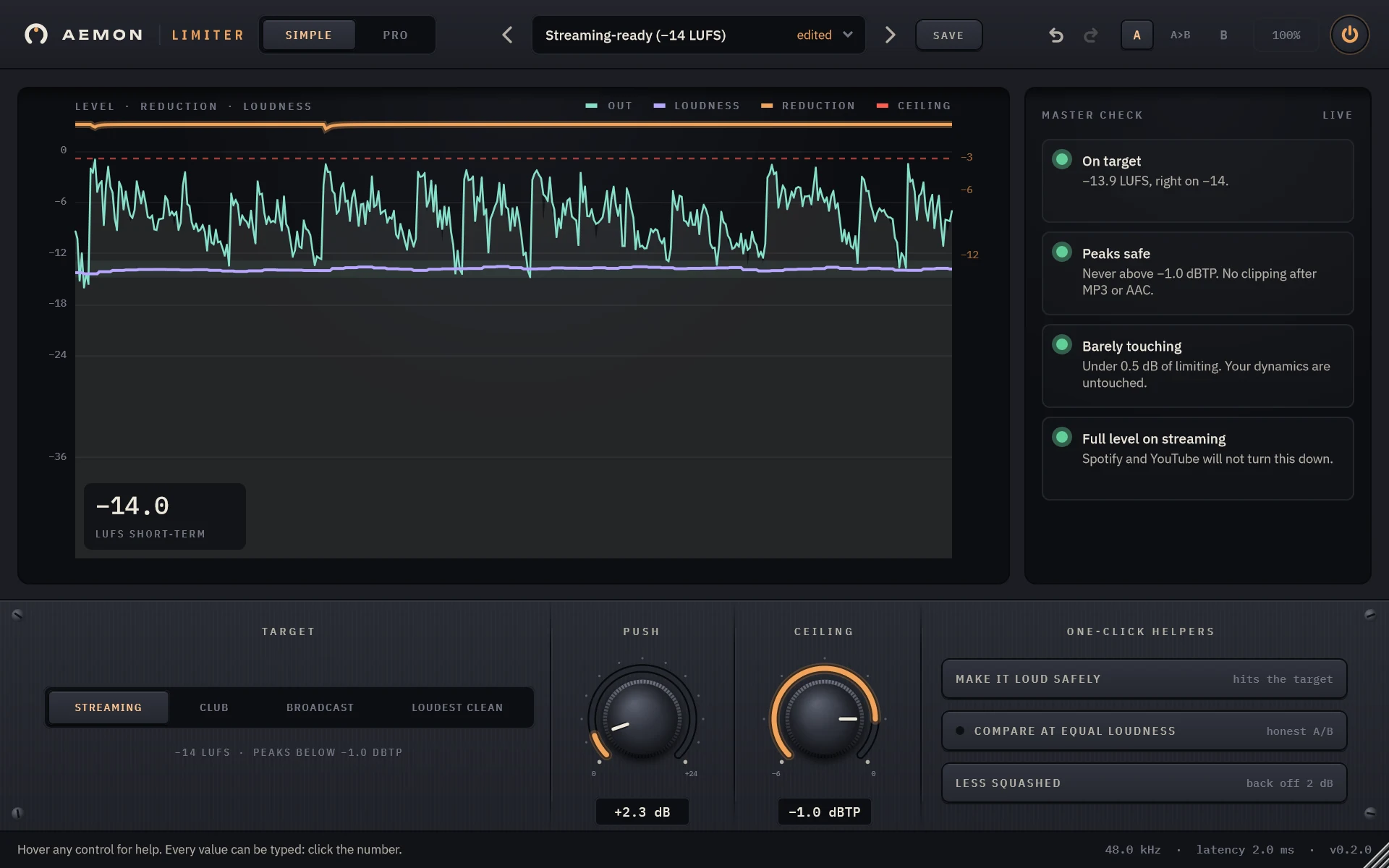
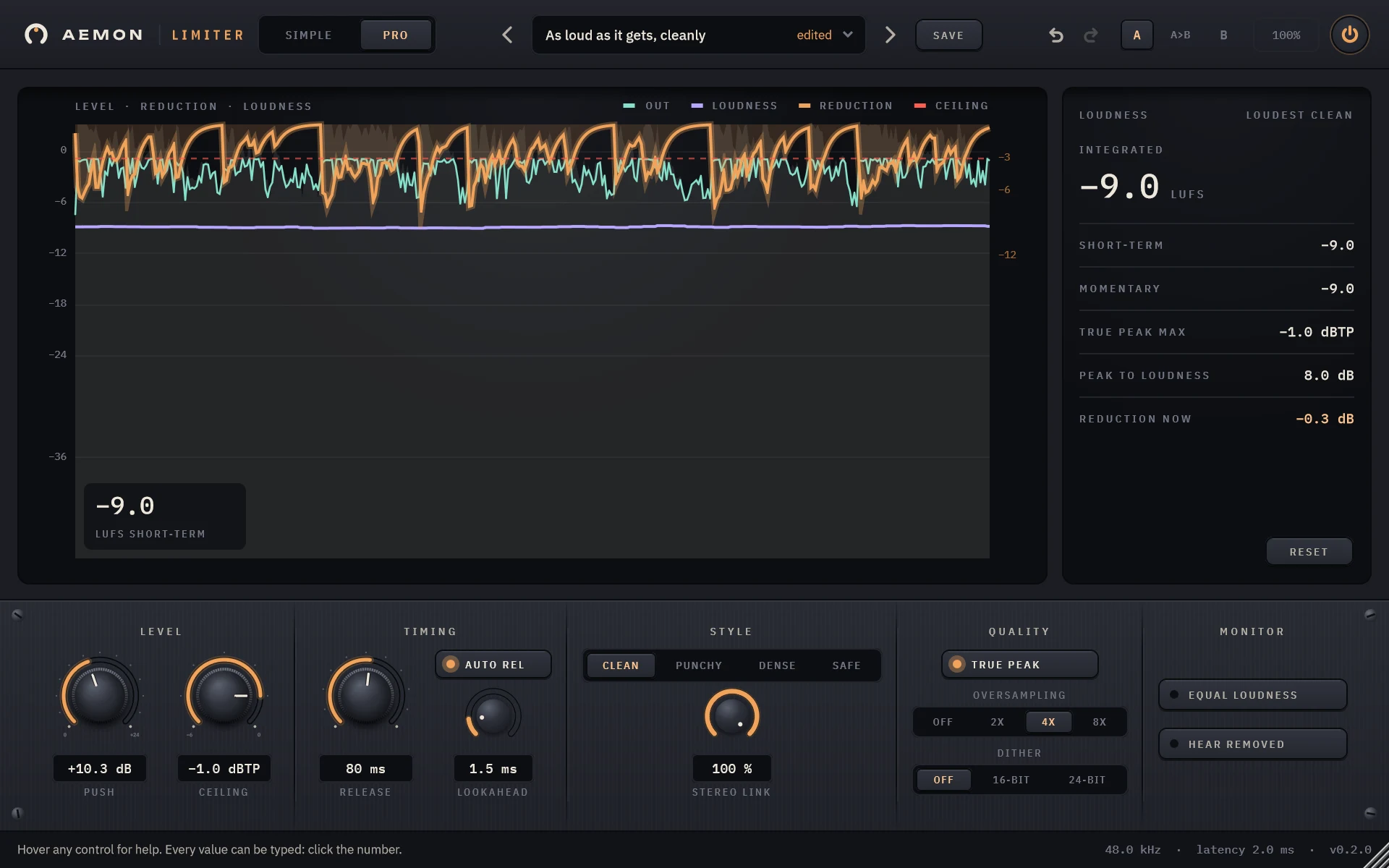
Make it loud, safely
Streaming, club, broadcast or as loud as it stays clean. It measures your track, sets the push, and won’t crush it to reach a number.
It checks its own output
A second stage measures the limited signal with the official meter filter and trims the last tenths, so converters and codecs don’t clip.
Compare at equal loudness
One button plays the limited sound as quietly as the original, so bypass compares sound, never volume. Exports ignore it.
Two ways in. One sound.
Every plugin has a Simple and a Pro side. They share the same settings, so switching never changes what you hear. Drag across.
Simple, on the left
A few big controls, live checks in plain language and one-click fixes that stay safe. For when you want the result.
Pro, on the right
Every parameter, every meter, every routing option, all automatable. For when you know exactly what you’re after.
Measured, then released.
Nothing here is a slogan. These figures come from the automated tests that run on every build, and the tests are public with the code.
An EQ curve that stays in shape
A +9 dB bell at 13 kHz, 48 kHz session. Aemon stays within 0.2 dB of the analogue curve. The textbook digital filter ends 4.4 dB away.
A ceiling that holds between samples
Highest true peak over 108 limiter setups per signal, ceiling at −1.0 dBTP. The grey bars are how far peaks escape when a limiter only watches samples. Above 0 can clip.
| What | How it’s tested | Result |
|---|---|---|
| Untouched means untouched | All nine at neutral (Limiter and Clipper with peaks under the ceiling), 44.1 to 192 kHz, mono and stereo | Bit-exact |
| Loudness meter | 1 kHz at −23 dBFS should read −23 LUFS, three sample rates | within 0.01 LU |
| Compressor attack | Set to 10 ms, measured to the 63 % point | 9.98 ms |
| Compressor lookahead | First peak after silence, with and without 5 ms of lookahead | 16.2 → 0.1 dB over |
| Auto level | Loudness change after settling, 12 dB of compression | 0.02 dB |
| Make it loud safely | Asked for −14 LUFS on a quiet mix, then measured playing | −14.06 LUFS |
| Limiter release | Set to 100 ms, auto release off | 100.0 ms |
| De-esser on vowels | Five synthetic singers, every vowel, at the default detection | Untouched |
| De-esser, quiet and loud | The same S after level jumps of up to 12 dB inside a take | within 0.5 dB |
| Imager in mono | Mono mix before and after, 60 random settings | same, −144 dB |
| Clipper false tones | 5 kHz tone, 12 dB into a hard clip, 48 kHz session | −90 dB |
| Saturation display | Harmonics shown against harmonics measured, every character and focus | within 0.2 dB |
| Multiband presets | Cut on the loud parts, every preset on four different sounds | within 0.5 dB or 15 % |
| Switching anything | Polarity, gain, threshold, ceiling, characters, bands and bypass, changed during playback | No clicks |
| Plugin stability | pluginval, the industry host test, at its strictest level, all nine plugins | 10 / 10 |
246 presets that say what they do.
No “Magic Glue 3”. Every preset is named after the result, with one line that tells you how it gets there. The plugin shows it when you load it.
The details, in all nine.
A/B and undo
Two full settings to compare, and every move can be taken back.
Any size, always sharp
Drag the corner from 60 to 200 %. Everything is drawn, nothing is a picture.
Hands on everything
Drag, fine-tune with Shift, scroll, double-click to reset, or type the number.
Help on hover
Point at any control and the strip below explains it in a sentence.
Click-free automation
Every control is smoothed and can be automated from your DAW.
44.1 to 192 kHz
Mono and stereo, tested at every common sample rate.
Light on the CPU
Seven of the nine use under 4 % of one core. The Clipper uses about 5, Saturation about 6.
No account, no phoning home
Nothing to register, nothing collected, works offline forever.
For the love of the game.
I make music, and I’ve paid for plenty of plugins. Too many of them were a pretty window with a mystery inside.
So I built the ones I wanted. They look like gear, they tell you the truth, and they explain themselves. If you’re starting out, Simple mode gets you there without a manual. If you’ve done this for twenty years, Pro mode stays out of your way.
They’re free because I want everyone to have them. No trial, no lite version, no email first. The code is open too, so anyone can check how they work, learn from them, or make them better.
If you make something with them, I’d love to hear it.
One installer. All nine.
Tick what you want, or keep everything. It finds the Aemon plugins you already have, updates them and adds the new ones. It uninstalls cleanly. It never closes your DAW, and your own presets stay yours.
Windows 10 or 11, 64-bit. Any VST3 host. Free, AGPL-3.0. Read the guide
- Run the installerClose your DAW first. Windows will ask twice, because Aemon isn’t signed yet. See what to press
- Rescan pluginsOpen your DAW’s plugin manager and scan for new plugins.
- Load AemonAll nine start with Aemon in the effects list.
Choose your plugins
All nine are selected. They work on their own or together.
Why Windows asks, and what to press.
Aemon isn’t signed yet. A signature is a certificate that tells Windows who made a file, and ours is coming soon. Until then Windows shows two warnings. Here is each one, and why it’s there.
Windows protected your PC
Windows SmartScreen prevented an unrecognised app from starting.
More info
App: Aemon-Suite-Setup.exe
Publisher: Unknown publisher
1. “Windows protected your PC”
Press More info, then Run anyway. Windows shows this for any new app that few people have installed and that has no signature. It means it doesn’t know the file yet. It doesn’t mean it found something bad.
User Account Control
Do you want to allow this app from an unknown publisher to make changes to your device?
Aemon-Suite-Setup.exe
Publisher: Unknown
2. “Make changes to your device?”
Press Yes. Plugins go in the VST3 folder that every DAW on the computer shares, and only an administrator may write there. “Unknown publisher” appears because of the missing signature. Setup adds the plugins, their uninstaller, and nothing else.
If your browser stops the download
It may say the file isn’t downloaded often. Open the download’s menu and choose Keep.
Signing is coming soon
Next, we apply for free open-source signing. Windows may still ask for a few weeks after that, until enough people have installed it.
Check it’s the real file
Every release lists a SHA-256 checksum. Compare it with yours before you run anything. How to do it
Questions, answered.
What’s the catch?
There isn’t one. No strings, no login, no email, no data asked, no trial that runs out. I made them for the love of the game. The full plugins are free, for personal and paid work, with no time limit and no watermark. What you make with them belongs to you.
Will it work in my DAW?
If your DAW loads 64-bit VST3 plugins on Windows, yes. That covers most of them.
Is there a Mac version?
Not yet. The plugins are written to run on macOS too, and a Mac version (VST3 and AU) is planned after the Windows release.
Why does Windows warn me when I install?
Because the installer isn’t signed yet, and because it’s new. Signing is coming soon. This is what you’ll see and what to press. Only download Aemon from this page or from the project’s GitHub releases.
Do the plugins collect anything?
No. They never connect to the internet. This page has no cookies and no tracking either.
Can I read or change the code?
Yes. Aemon is open source under the AGPL-3.0 licence. You can study it, build it yourself, and share your changes under the same licence.
What comes next?
A vocal rider, a transient shaper, a tool that makes kick and bass fit, reverb and delay, then a rack that holds them all. Each one is tested like these, and comes out when it’s ready.
New to mixing? Start here.
Recording, vocals, drums, 808s, loudness, and a checklist before you export. Written for any DAW and any plugins.
Finish the one you’re working on.
Download freeNine plugins. Nothing to pay, nothing to sign up for, now or later.